

Enhanced Calendar
This is perhaps the most significant change. The updated calendar features a more modern design making it easier to use and even more intuitive when it comes to managing your appointments and meetings. Key highlights include: Flexible Views - easily switch between day, week, and work week views with detailed information about your tasks and appointments. Team Calendar - enhanced team calendar view makes it easier to stay up to date with your teams’ activities. New Agenda View - a new visual agenda lets you manage tasks and appointments on one list. Dedicated Task View - tasks are now available on their own tab for easy access and management. Customers should be delighted with the new features and design makeover as some have reported that the legacy calendar was somewhat cumbersome.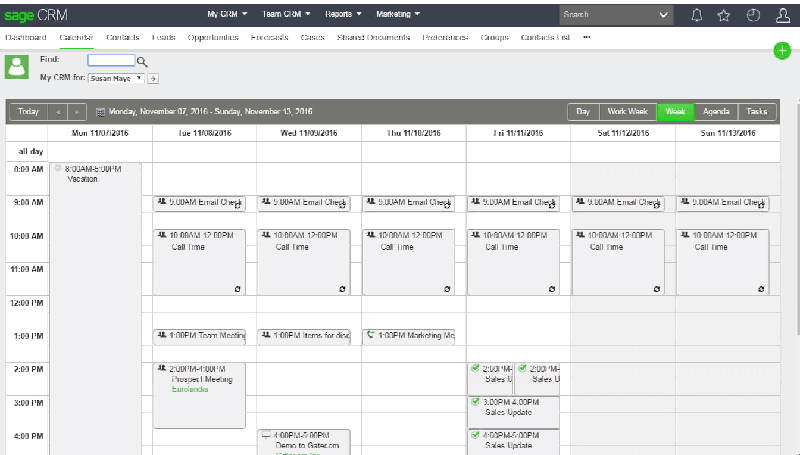
Optimized Navigation and Search
An updated top navigation bar now allows you to easily search for and access CRM records and active notifications. New Quick Find - a more dynamic search function that looks across the entire application at once including standard and custom entity records. Improved Notifications - now appearing at the top of your screen, notifications have been revamped in order to reduce disruption and keep your workspace from being obscured. New Favorites Feature - organize favorite items and records and then easily access them with the click of an icon.Other Enhancements
A Secure Email Connection (via TLS) now allows you to securely access public mail services such as Exchange Online and Gmail directly from within the Sage CRM product, without the need for other software. In addition, the Sage CRM Help System now accesses help files that are hosted on dedicated web servers. By moving these files to the cloud, it reduces the size of your local Sage CRM installation and ensures that you’re getting the most up to date guidance.A Note Before Upgrading
If you’re running Sage 300 integrated with Sage CRM, please be sure to check with us on compatibility before upgrading.FAQ
What's new in Sage CRM 2017 R1?
An enhanced calendar, new Quick Find search, overhauled notifications, a Favorites feature, secure email connection via TLS, and over 50 customer fixes.
What changed in the Sage CRM 2017 calendar?
It has a more modern design with flexible day, week and work week views, an enhanced team calendar, a new agenda view and a dedicated task tab.
How does Quick Find work in Sage CRM 2017?
It searches across the entire application at once, including standard and custom entity records.
Can Sage CRM 2017 connect to Exchange Online or Gmail?
Yes. A secure email connection via TLS lets you access public mail services like Exchange Online and Gmail directly in Sage CRM without other software.
Should Sage 300 users check anything before upgrading to Sage CRM 2017?
Yes. If Sage 300 is integrated with Sage CRM, check compatibility with Acumen before upgrading.
