
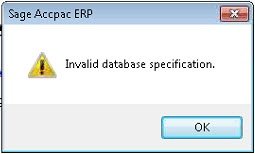
 Invalid Database Specification is a common error message that can occur when opening Sage 300 (formerly Sage Accpac).
The message "Invalid Database Specification" occurs when the Sage 300 client opens. On open, Sage 300 attempts to connect to the data. If it is unable to do so, the system will return this message.
Sage 300 Cannot Access Database
There are a number of reasons that a user could receive this message and thus cannot access the database. In the scenario where Sage 300 is being run where the database server is on a separate server for 300 server and the database server is unavailable, this message could occur for any users attempting to open Sage 300 and login to a company.Troubleshooting Tips
If it is a new installation, or just a single user, you need to examine why the workstation cannot connect to the database server. The workstation will connect to the database server in 2 different means. It will make both a direct connection using ADO. In addition, it will use an ODBC connection to data. Some good troubleshooting steps:- Check to make sure that the proper ODBC entries have been made
- Depending of your configuration in Sage 300 (Accpac) Database Setup you may need to make a single ODBC entry called databaseservername32 or an individual ODBC entry for each database (e.g. SAMSYS, SAMINC)
- If the workstation is 64-bit workstation, your entries must be made with the 32-bit ODBC client (C:\Windows\SysWow64\ODBCAD32.exe)
- Disable UAC (User Account Controls)
- This can often interfere with Sage 300 (Accpac) making a connection with the ODBC drivers
- Check that the version of Sage 300 (Accpac) that the right version of the SQL Client is set in the ODBC Entry. Starting with version 5.6 the SQL Native Client is required.
- Disable any firewall that may be blocking outbound traffic.
- Login as a user that has local admin rights on the machine and test as that user.
- If this fixes it, run RegAcc as the admin user. This will create all of the required registry entries that the non-admin user will need.
FAQ
What does Invalid Database Specification mean in Sage 300?
It appears when the Sage 300 client opens and can't connect to the data, for example if a separate database server is unavailable.
How does a Sage 300 workstation connect to the database?
It uses both a direct ADO connection and an ODBC connection, so both must work.
How do I fix ODBC entries for Sage 300 on 64-bit Windows?
Create the entries with the 32-bit ODBC client (ODBCAD32.exe in the Windows SysWow64 folder), either a single databaseservername32 entry or one per database depending on your Database Setup.
What else can cause Invalid Database Specification?
User Account Control interfering with ODBC drivers, the wrong SQL client version (SQL Native Client is required from version 5.6), or a firewall blocking outbound traffic.
What if it works only for an admin user?
Log in as a local admin and run RegAcc, which creates the registry entries non-admin users need.


